If you’ve ever fed a PDF into an LLM and got bad output, the problem was probably not the model. It was the parser.
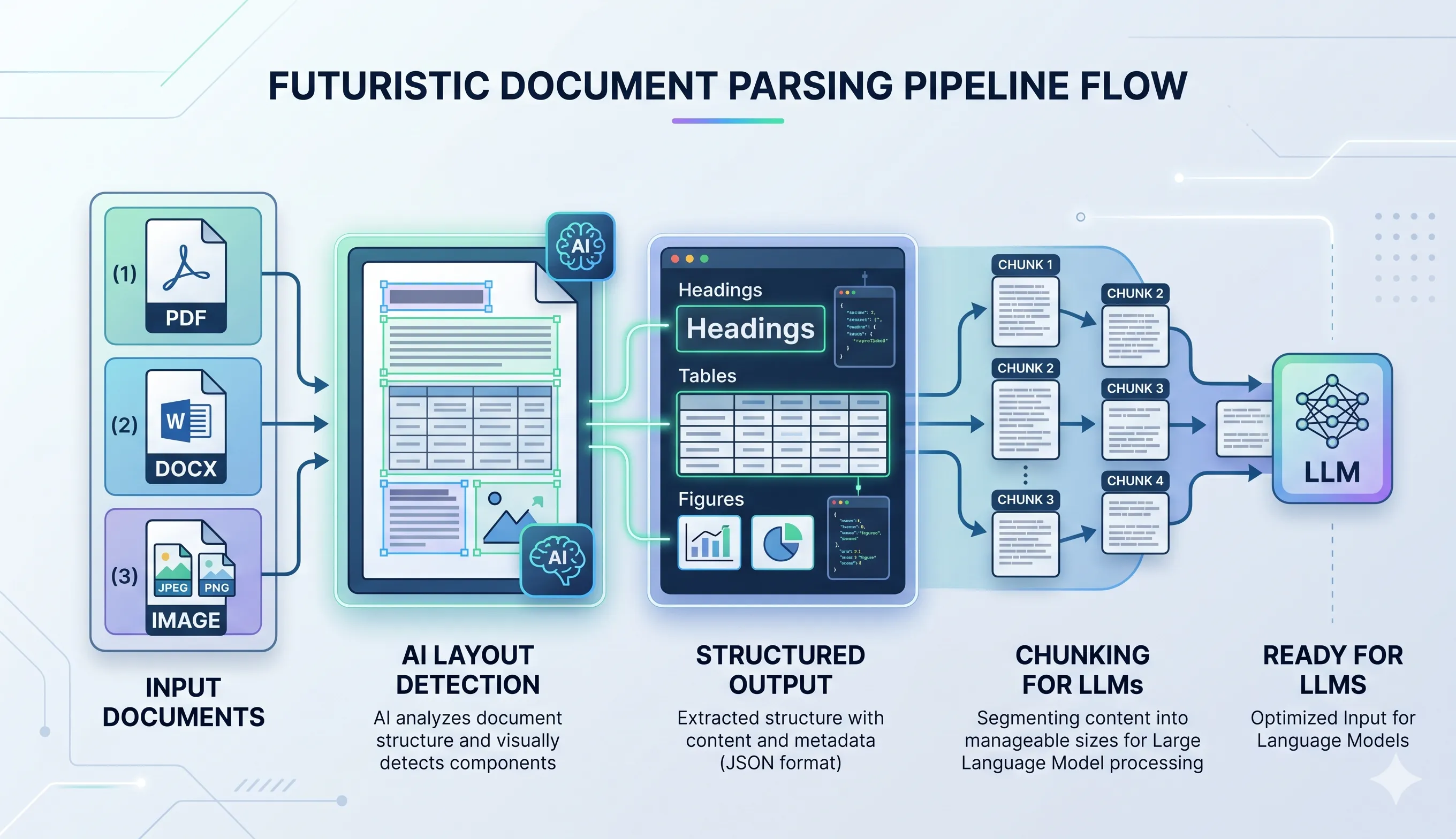
Docling is an open-source document AI pipeline by IBM Research that goes far beyond text extraction. Unlike traditional tools like pypdf or pdfplumber, Docling uses deep learning to understand document structure. It reconstructs tables, fixes reading order, and produces clean, LLM-ready output. Whether you’re building a RAG system, processing financial reports, or ingesting research papers, Docling is the document intelligence layer your pipeline is missing.
It extracts content and preserves the layout of the document.
generated by nano banana
Why Docling beats traditional parsers
Traditional libraries were not built for AI workflows.
| Feature | Traditional Parsers | Docling |
|---|---|---|
| Text Extraction | ✅ | ✅ |
| Layout Understanding | ❌ | ✅ |
| Table Reconstruction | ❌ (messy text) | ✅ (structured grid) |
| Multi-format Support | Limited | Extensive |
| Reading Order | Broken in columns | Correct |
| Chunking for LLMs | Manual | Built-in |
| Metadata Awareness | ❌ | ✅ |
The real problem with traditional tools
Traditional tools:
- Extract text based on positions, not meaning
- Break tables into unreadable blobs
- Completely mess up multi-column layouts
- Lose context like headings, sections, and hierarchy
Bad input leads to bad LLM output
Docling’s edge
What Docling does differently:
- Uses deep learning models, not heuristics
- Understands document structure like a human
- Outputs clean, structured, LLM-ready data
This is document understanding, not text extraction.
Multi-format support
Docling isn’t just for PDFs.
It handles:
- Word (.docx)
- PowerPoint (.pptx)
- Excel (.xlsx)
- HTML / Markdown
- Images (PNG, JPEG, TIFF)
- AsciiDoc
You can run one pipeline across mixed document types. Most traditional tools can’t.
The parsing phase
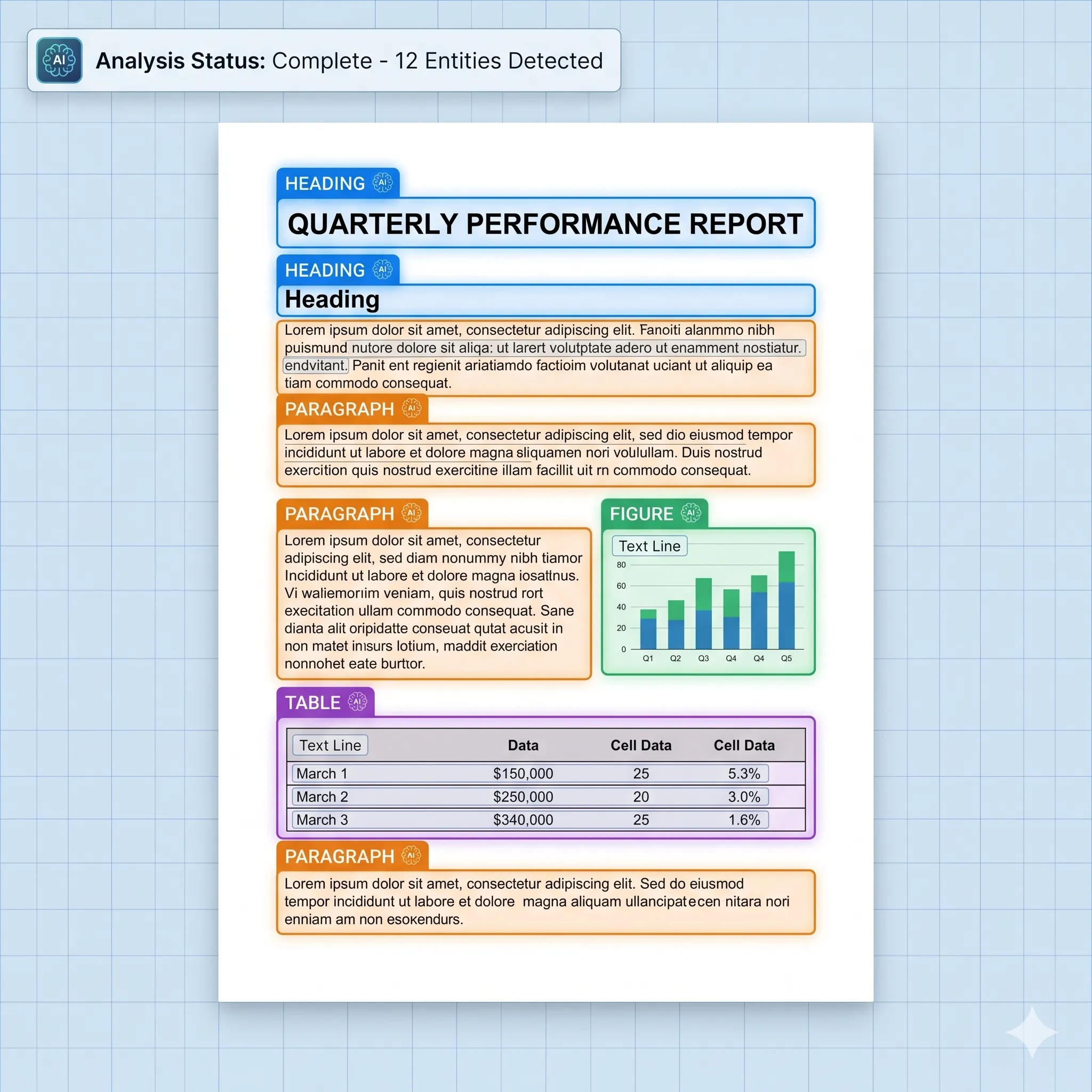
Layout understanding (DocLayNet)
Docling uses DocLayNet, a trained model that identifies:
- Headings
- Paragraphs
- Tables
- Figures
- Captions
- Footnotes
- Lists
- Code blocks
It identifies what each region is, not just the characters in it.
generated by nano banana
Table parsing (TableFormer)
Traditional tools split tables into broken text.
Docling uses TableFormer to:
- Reconstruct full table grids
- Handle merged cells
- Understand multi-line headers
- Preserve row/column relationships
The output is clean, structured data.
Figure and chart detection
- Extracts figures as images
- Links them with captions
- Maintains document context
Note: It does not interpret chart data. It only isolates it.
OCR
For scanned documents:
- Uses EasyOCR / Tesseract
- Maintains layout-aware reading order
Reading order is preserved on a single page.
Reading Order Recovery
This is a silent killer in PDFs.
Docling:
- Fixes multi-column reading
- Reconstructs logical flow
- Makes documents actually readable for LLMs
Chunking for RAG
If you’re building RAG systems, this is the part that saves the most manual work.
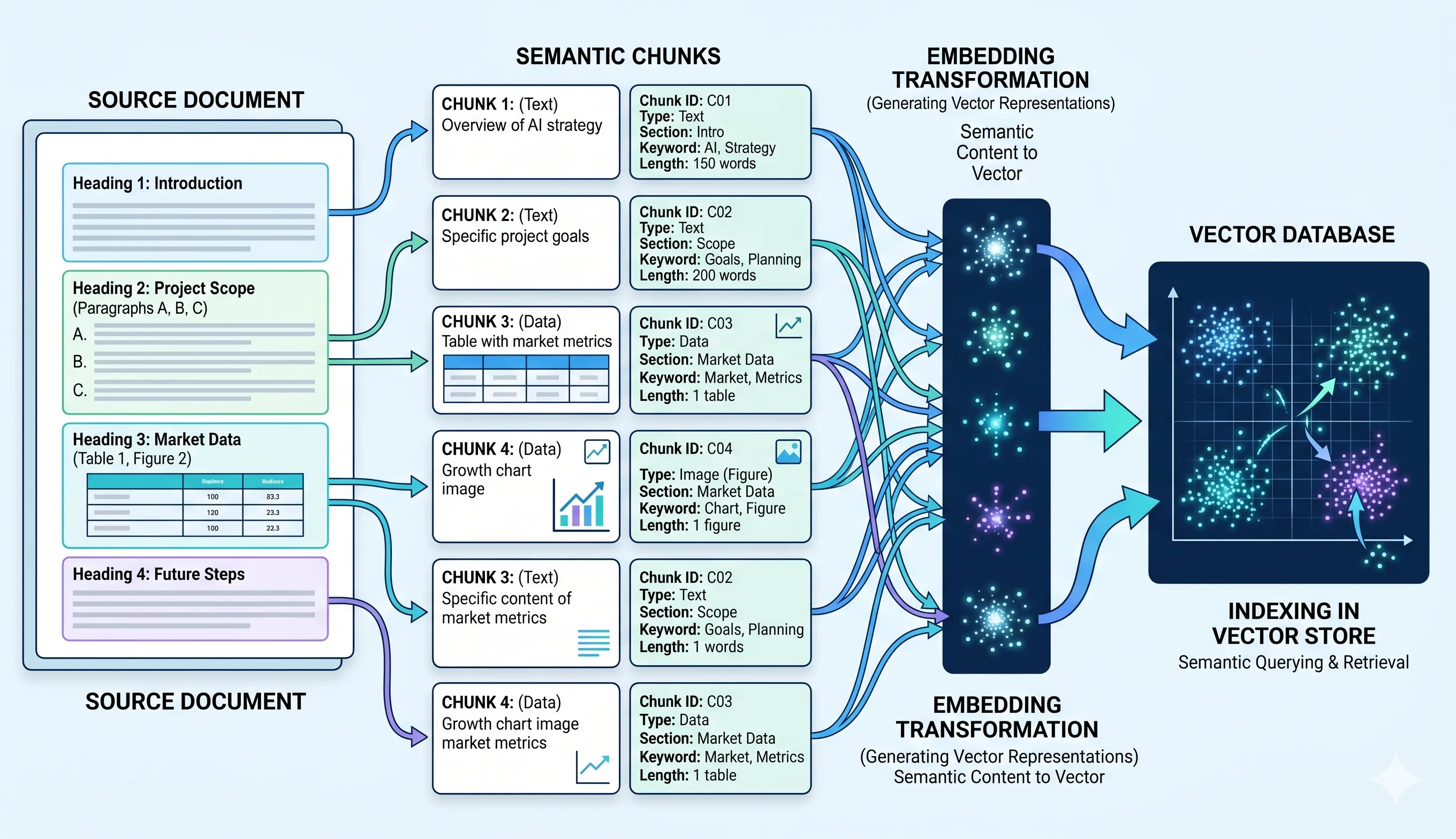
Hierarchical Chunking
- Respects structure (heading → section → paragraph)
- No random splits mid-sentence
Hybrid Chunking
- Combines:
- Semantic structure
- Token limits
The chunks fit LLM context windows without manual splitting
Context preservation
Each chunk carries:
- Page number
- Bounding box
- Section hierarchy
Retrieval results carry metadata so they are accurate and explainable
Tables and figures stay intact
- Tables are never split
- Figures remain atomic
Tables and figures are not split across retrieval chunks
generated by nano banana
The DoclingDocument class
Instead of raw text, Docling outputs a:
DoclingDocument
A structured representation of:
- Entire document hierarchy
- Layout elements
- Metadata
You can export it as:
- Markdown
- JSON
- HTML
This makes the pipeline composable
Plug-and-play with LLM ecosystems
Docling integrates with:
- LlamaIndex
- LangChain
- Hugging Face datasets
Drop it straight into your RAG pipeline as the ingestion layer.
Where Docling is limited
Known limitations:
- No chart-to-data interpretation
- Slow for very large documents (200+ pages)
- Overkill for simple text PDFs
When to use Docling
Use Docling when working with:
- Research papers
- Financial reports
- Technical documentation
- Contracts
In short, Docling fits any structured document.
When not to use it
Skip Docling if:
- You just need plain text extraction
- Your documents are extremely simple
In those cases, lighter tools are faster.
Bonus: notebook for hands-on usage
A notebook at the end shows Docling in action.
Final thoughts
Docling is a layout-aware parser, not a text-only one.
If traditional tools are:
“Extract text and hope for the best”
Docling is:
“Understand the document, preserve its meaning, and make it LLM-ready”
My take
As LLM applications grow, input quality matters more than model size.
Docling solves the real bottleneck: It turns messy documents into structured data.
That is why it fits this pipeline better than a text-only parser.