How to Integrate Google Drive with FastAPI Using OAuth2
generated by nano banana
Integrating Google Drive with FastAPI enables features like cloud storage synchronization, workflow automation, and secure file access. Whether you’re building a SaaS application, internal tooling, or document processing pipelines, Google Drive integration allows your FastAPI backend to authenticate users, fetch their Drive files, and download or process them securely.
In this guide, you learn how to:
- Implement Google OAuth2 in FastAPI
- Securely store and refresh Google tokens
- Fetch and list Google Drive files
- Download single or multiple files from Drive
- Log out and invalidate tokens
- Structure your backend for scalability
This tutorial includes full source code, a complete explanation, and an OAuth2 flow diagram.
Why integrate Google Drive with FastAPI?
Some use cases:
- Build a document management system
- Allow users to upload Google Drive docs into your app
- Automate PDF extraction or cloud-based processing
- Sync Drive folders for automation workflows
- Enable “Login with Google” + Drive browser UI
FastAPI’s asynchronous nature and Google’s APIs make the combination a good fit for modern cloud applications.
Prerequisites
Make sure you have:
- Python 3.11+
- FastAPI
- Google API Python Client
- SQLAlchemy
- A Google Cloud Console Project
Step 1: Create Google OAuth credentials (required)
Before writing any FastAPI code, you must configure OAuth credentials.
Create a project in Google Cloud Console
https://console.cloud.google.com/
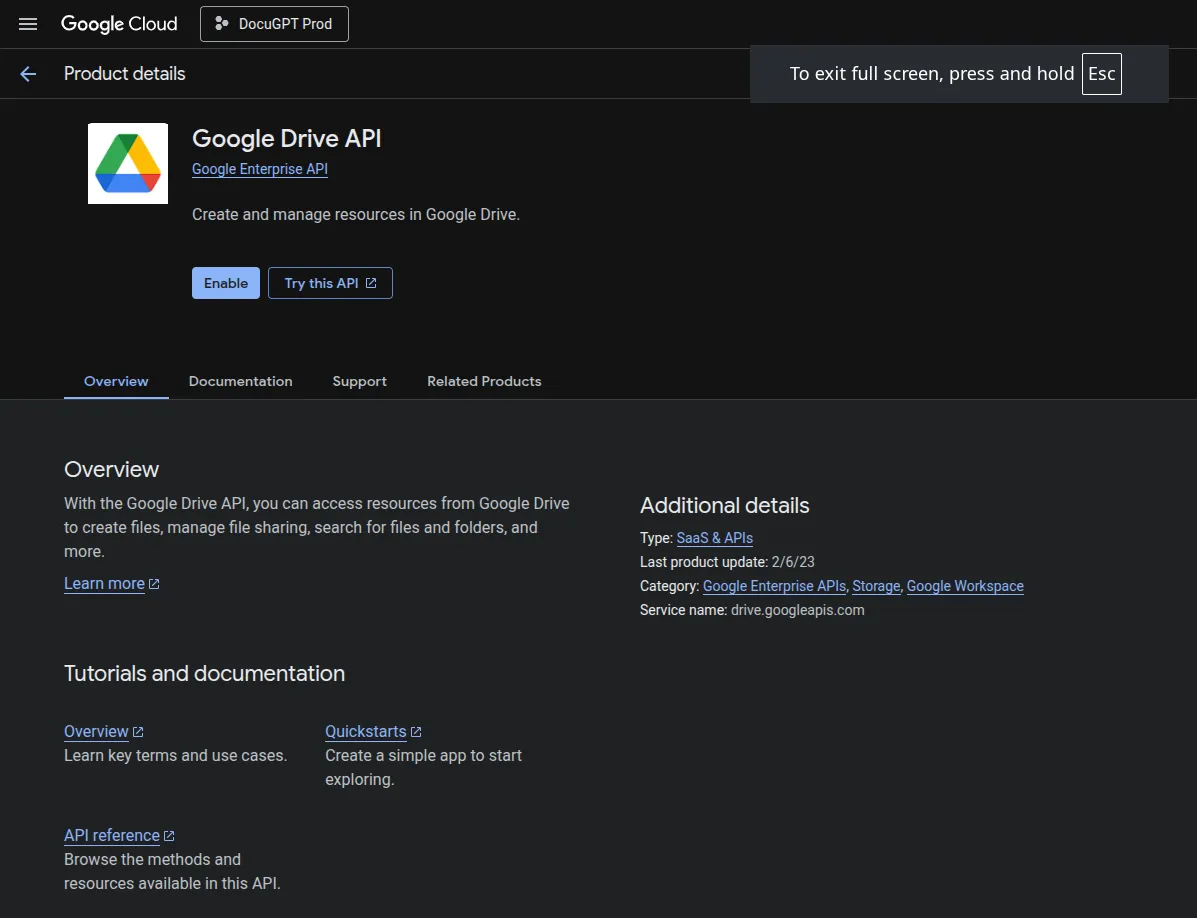
Enable the Google Drive API
Navigate to:
APIs & Services, Enable API, Google Drive API.
Create an OAuth client ID
Go to:
APIs & Services, Credentials, Create Credentials, OAuth Client ID.
Choose:
- Web Application
- Add redirect URI:
http://localhost:8000/google/callbackOr for production:
https://yourdomain.com/google/callback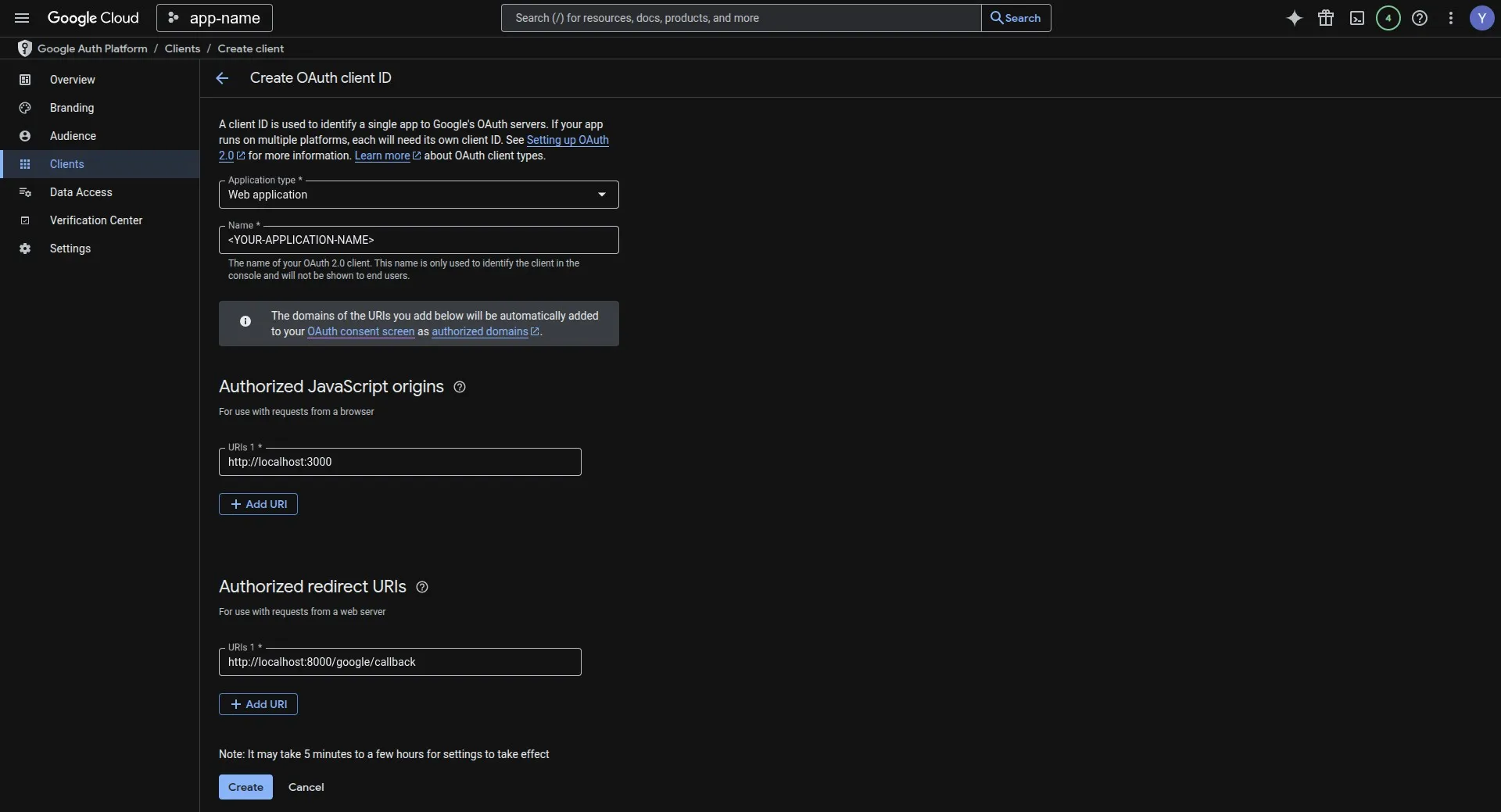
Save the client ID and secret in .env
GOOGLE_CLIENT_ID=your-client-id
GOOGLE_CLIENT_SECRET=your-client-secret
BACKEND_URL=http://localhost:8000
DOWNLOAD_DIR=./downloads
The OAuth2 authentication flow
Below is a simple Google OAuth2 flow diagram:
                    ┌───────────────────────────┐
                    │         User UI           │
                    └──────────────┬────────────┘
                                   │ Click "Login with Google"
                                   ▼
                        ┌──────────────────────┐
                        │     FastAPI Backend  │
                        └──────────────┬───────┘
                                       │ Redirect to Google OAuth URL
                                       ▼
                           ┌────────────────────────┐
                           │   Google OAuth Server  │
                           └──────────────┬─────────┘
                                          │ User selects Google account
                                          │ User grants Drive permissions
                                          ▼
                      ┌──────────────────────────────────┐
                      │ Google redirects back to FastAPI │
                      │   /google/callback               │
                      └─────────────────────┬────────────┘
                                            │ FastAPI exchanges code for tokens
                                            │ Save tokens in DB (access + refresh)
                                            ▼
                               ┌─────────────────────────────┐
                               │  FastAPI grants access to   │
                               │ Google Drive API via tokens │
                               └─────────────────────────────┘
Add your own branded or graphical version later.
Step 2: A working FastAPI to Google Drive integration
Below is the full working code (exactly from your original submission). This code handles:
- Google OAuth
- Saving tokens
- Refreshing expired tokens
- Listing Google Drive files
- Downloading files
- Logout
The full FastAPI code

Code walkthrough
1. Handling OAuth authentication
The /api/auth/google endpoint creates the Google authorization URL:
@app.get("/api/auth/google")
async def google_auth():
What this endpoint does
This endpoint starts Google OAuth2 auth in FastAPI. It builds the authorization URL where the user grants access to their Drive files.
2. The OAuth callback: exchanging the code for tokens
@app.get("/google/callback")
async def google_auth_callback(...)
What happens here:
- User returns after Google login
- FastAPI exchanges the code for an access token and a refresh token
- Fetches user email
- Saves/updates tokens in DB
- Returns success HTML
This is a required step for any Google OAuth2 FastAPI backend.
3. Token refresh logic
Google access tokens expire every 1 hour, so we must refresh them:
def get_valid_credentials(user_email: str, db: Session):This prevents:
- Expired-token errors
- Forced logins mid-session
- The backend losing authorization over time
A good fit for backend automation and cron jobs.
4. List the user’s Google Drive files
@app.get("/api/list-drive-files")Returns these fields:
- ID
- Name
- MimeType
- Owner
- Size
- Created/Modified timestamps
For a UI such as:
“Browse your Google Drive files inside our app”.
5. Download files from Google Drive
@app.post("/api/download-file")This allows:
- Server-side processing of Drive files
- Importing documents
- PDF extraction & ML pipelines
- Cloud backups
The file is downloaded in chunks and stored under /downloads.
6. Download multiple Google Drive files
Useful for:
- Batch exports
- ZIP preparation
- File syncing workflows
7. Logout and token deletion
@app.delete("/api/logout/{user_email}")This removes saved Google tokens so the user must re-authenticate.
What you now have
The integration above is a working starting point. On top of it you can:
- Authenticate users with Google OAuth2
- Store and refresh tokens securely
- Access Google Drive using the API
- List and download user files
- Build cloud storage features
Common uses:
- Document processing apps
- Automation and AI workflows (LLMs + PDFs)
- Enterprise dashboards
- Cloud sync services
- File ingestion pipelines